A slow biotech website can cost your business valuable leads. Researchers may leave before reading your findings. Buyers may struggle to view product details. Potential partners may lose interest when key pages take too long to load.
These problems can affect trust and sales. They can also reduce the value of your marketing efforts.
Biotech websites often contain large images, research papers, videos, and product data. These resources help explain complex services, but they can also slow down your pages.
You do not always need a new website to fix the problem. In many cases, a few focused changes can improve speed and usability.
This guide explains how to find slow pages, fix common issues, and choose the right support. It also shows how better website performance can support your SEO and business goals.
Find the Pages That Need Attention
Start by testing the pages that matter most to your business. These may include product pages, laboratory services, research summaries, and contact forms.
Do not assume every page has the same problem. Your homepage may load quickly while a product page takes much longer. A contact form may also fail when visitors try to submit it.
Use Google PageSpeed Insights to test key pages on mobile and desktop. Review the results and look for issues that affect real users.
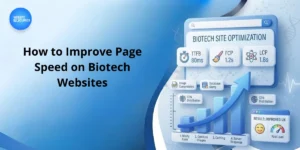
Pay attention to Google’s Core Web Vitals:
- Largest Contentful Paint (LCP): The main content should load within 2.5 seconds.
- Interaction to Next Paint (INP): Pages should respond to user actions within 200 milliseconds.
- Cumulative Layout Shift (CLS): The page should have a score of 0.1 or less.
These are useful targets, not guarantees of better rankings or sales.
Record your results before making changes. This gives you a clear starting point. You can then compare the results after each fix.
Focus first on pages that support sales, enquiries, and important customer decisions. This helps you spend time and money where they matter most.
Remove Unnecessary Files and Code
Large images and heavy scripts can slow down your website. This often happens when a site uses high-resolution photos, videos, animations, or too many plugins.
Start with your images. Resize each file to fit the space where it appears. Compress it without losing important scientific details. Formats such as WebP and AVIF can also reduce file size.
Load images below the first screen only when needed. Keep the main image ready to load early, as it may be the first thing visitors see.
Next, review your plugins and scripts. Remove tools that no longer serve a clear purpose. Reduce large CSS and JavaScript files where possible.
Your hosting service also affects speed. A slow server can delay every page. Browser caching and server-side caching can reduce repeated work and improve load times.
Ask your developer to check:
- Large images and unused files.
- Plugins and third-party scripts.
- Server response times and caching.
- Large CSS and JavaScript files.
- Redirects that delay page loading.
Test changes before applying them to your live site. Some scripts support secure forms, consent settings, or analytics. Removing them without testing may break important features.
The goal is simple: reduce loading time while keeping the tools your business needs.
Make Scientific Information Easy to Access
Biotech websites must explain complex products and research. Visitors may need product data, laboratory details, study results, or technical documents.
The challenge is to make this information easy to find without loading too much content at once.
Start each page with the information visitors need most. Explain the product or service, who it helps, and what the visitor can do next. Place detailed specifications and supporting documents further down the page.
For large PDF files, add a short HTML summary. This lets visitors understand the document before opening it. Compress downloadable files when possible, but keep all scientific details accurate.
Avoid playing videos automatically. Use a preview image and let visitors choose when to play the video. This reduces unnecessary data use.
Check your website on mobile devices, too. Researchers, buyers, and partners may need your information while away from their desks.
Clear headings and short paragraphs also help visitors scan a page. They can find key details without reading every section.
A well-organised website serves different audiences more effectively. Researchers can reach technical data, while business buyers can find service details and contact options.
Use Website Speed to Support SEO
A fast website can support your SEO efforts, but speed alone will not bring more customers. Your pages must also answer relevant questions and explain your services clearly.
Review your main product and service pages. Make sure each page explains what you offer, who you serve, and how people can contact you.
For example, a biotech company offering laboratory services should explain its capabilities and process. It should also identify the customers it supports. A fast page with little useful information will not meet these needs.
Check whether search engines can access your important pages. Review indexing, page titles, internal links, and mobile usability. Fix major issues before adding more content.
Google Search Console can help you review search queries and page performance. Customer questions can also reveal topics your website needs to cover.
Use terms such as biotech SEO and life science SEO only when they fit the topic. Repeating keywords does not make a page more useful.
Scientific content needs special care. Use reliable sources and explain technical terms. Where appropriate, identify the author or qualified reviewer. Keep claims accurate and update information when needed.
A strong SEO plan combines useful content, sound technical work, and clear website structure. Better speed helps people reach that content with less effort.
Choose the Right Technical Support
Some speed problems are easy to fix. Others need a developer with experience in hosting, code, or complex website features.
The right solution depends on your website. Image compression may fix a simple problem. Slow performance across many pages may point to deeper technical issues.
Before hiring a provider, ask for a website audit. The report should explain the main problems, the proposed fixes, and how the results will be measured.
Ask these questions before you commit:
- Which pages need attention first?
- What work will the project include?
- Will the changes affect forms or other features?
- How will you test the results?
- What support will be available after launch?
If you compare top biotech SEO agencies, look for clear advice rather than broad promises. A good provider should explain how its work supports your business, not just how it may improve a speed score.
Content support can also help when your website fails to explain complex services. Top content marketing services for biotech enterprises should understand your audience and business goals. Life science copywriting for early-stage healthcare startups also needs accurate claims and clear wording.
WebsiteForClinics provides website design and development for healthcare-related businesses. When choosing any provider, check its experience, project scope, and reporting process before you make a decision.
Measure Results After Each Change
A website update should solve a clear problem. Track performance after major changes to see whether the work has helped.
Compare your results with the starting figures from your first audit. Test the same pages and use the same tools where possible.
Review several measures together. Core Web Vitals show how users experience loading and interaction. Analytics can show how people use your pages. Enquiry records can show whether your site supports business growth.
For example, a faster service page may help visitors reach your contact form with less delay. If enquiries remain low, the problem may lie elsewhere. You may need clearer service details, stronger proof of experience, or a simpler form.
Keep a record of major website changes. This makes it easier to find the cause if performance drops after an update.
Do not judge success by one score alone. A better PageSpeed Insights score does not guarantee more leads or higher rankings.
Instead, focus on useful results. Make a change, test it, and decide what to do next. This approach helps you improve your website without wasting money on changes that do not solve the real problem.
Frequently Asked Questions
Large images, heavy scripts, slow hosting, and poor caching can all affect speed. Testing important pages helps you find the main cause.
Better speed can support page experience, but it does not guarantee higher rankings. Useful content, relevance, and other ranking factors still matter.
Not always. Image compression, caching, and code fixes may solve the problem. A rebuild may be needed if wider technical issues affect the site.
Test key pages after major updates. Review performance regularly, especially if you add new plugins, videos, or interactive features.
Some agencies provide both technical SEO and content services. Ask for a clear plan and make sure the team understands your business and audience.
Conclusion
A slow biotech website can make it harder for customers, researchers, and partners to find the information they need. Start by testing important pages and fixing the issues that affect users most.
Reduce large files, review your code, and make scientific content easier to access. Then measure the results and keep improving your website as your business grows.
WebsiteForClinics helps healthcare-related businesses improve their websites and online presence. Call +1 661-551-8135 to discuss your website needs and explore practical solutions.