
A biotech website has many jobs. It must explain products, share research, and help people learn about the company. It may also need to share news with investors.
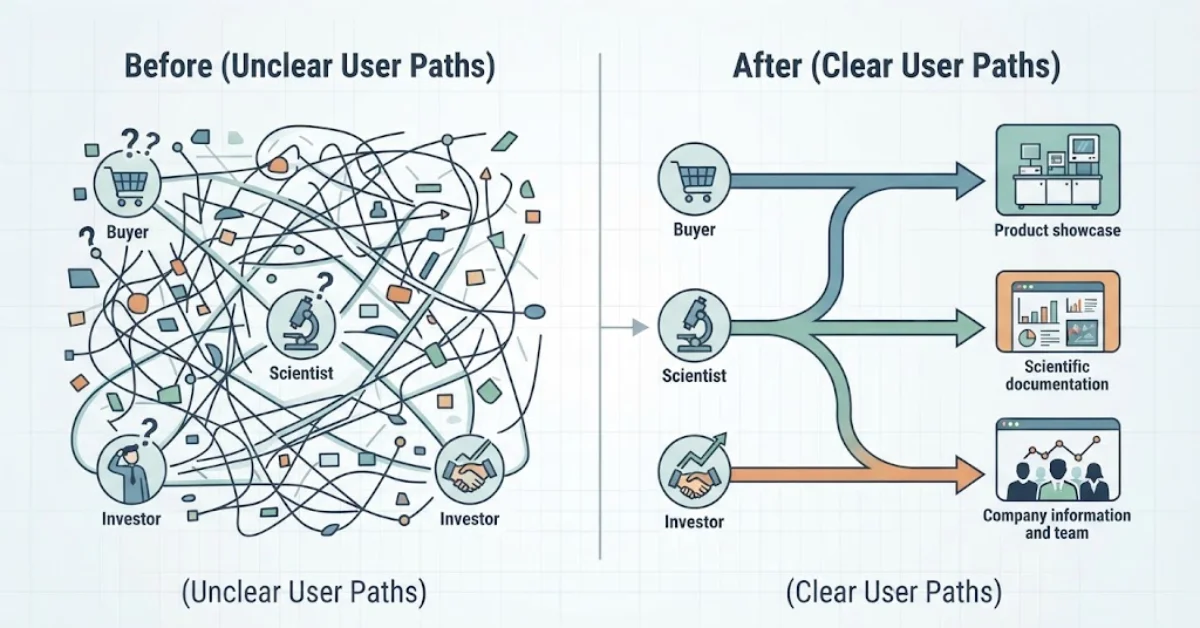
Each group has its own needs. Buyers want product facts. Scientists look for research and data. Investors want to know about the team and its plans.
A clear site helps each person find the right page. It saves time and builds trust. It also helps search engines learn what each page is about.
Good biotech website design starts with the user. It should make hard topics easy to follow. It should also work well on phones and computers.
This guide shows you how to plan your pages, share research, and build a site that serves your business.
Plan Your Pages Around Your Users
Start by asking who will use your site. Then find out what each group needs to know.
A buyer may want to check a product before asking for a quote. A scientist may need test results or research papers. An investor may want to learn about the team and the firm’s goals.
Give each group a clear path. Use a short menu with simple names. Avoid labels that make people guess what a page contains.
Most biotech sites need three main areas:
- Products: Show what each product does and how it works.
- Research: Share study results, papers, and project updates.
- Company: Explain the business, team, goals, and investor news.
You can add more pages when they serve a clear need. These may cover jobs, news, support, or partners.
Give every page one main job. A product page should focus on the product. A research page should explain the science. A company page should tell people who you are.
Do not add pages just to make the site look bigger. Each page should help a user find an answer or take the next step.
This simple plan makes the site easier to use. It also helps your team keep the content clear as the business grows.
Create Clear and Useful Product Pages
Product pages should answer the main questions buyers ask. What is the product? What does it do? Who can use it? Where can they learn more?
Start with the product name and a short summary. Use plain words to explain its main use. Then add the facts that buyers need.
These may include:
- Main uses and features
- Product specs and limits
- Storage and care details
- User guides and research links
- Sales or tech support details
Keep the layout the same across similar pages. This helps people compare products with less effort.
Add a clear next step. Some visitors may want a quote. Others may need a guide or help from your team. Make these options easy to find.
Use facts to explain why a product may be useful. Avoid claims like “the best” unless you can prove them.
Make each page easy for all users to read and navigate. Use clear headings, descriptive links, and text that works well with assistive tools. For more tips, see this guide to pharmaceutical website accessibility.
Be careful when a product links to medical research. State what it is made for. Do not claim that early test results prove a treatment works.
Clear product pages help buyers make better choices. They can also help your team get more useful questions from people who visit the site.
Make Research Easy to Read
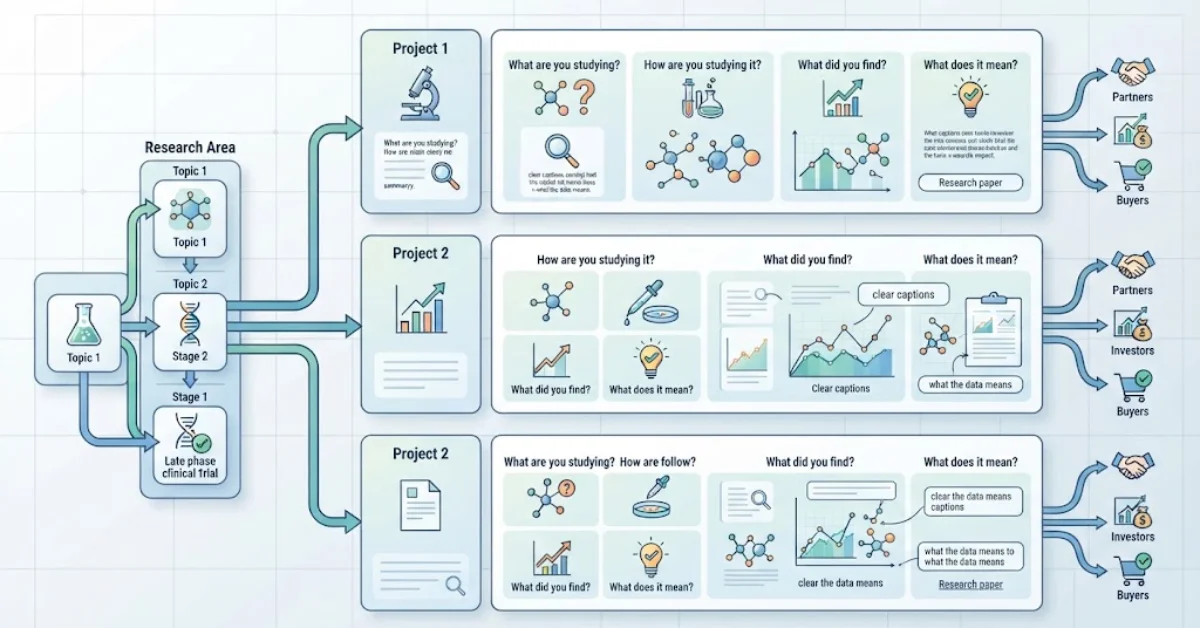
Research is a key part of many biotech firms. But hard words and long pages can make it tough to follow.
Create a research area that groups work by topic or project. You can also sort it by stage. Pick a system that fits your work and is easy to use.
Each page should answer four simple questions. What are you studying? How are you studying it? What did you find? What does it mean?
Add links to research papers when you can. These help readers check the facts and learn more.
Start with a short summary. Then add more detail for people who want it. Use clear headings, charts, and captions to guide readers through the data.
Be clear about what the results show. Early findings may need more tests. A planned study is not a finished study. Tell readers when facts are still unclear.
Charts should help people see the main point. Give each chart a clear title. Label its parts and explain what the data means.
A clear research page helps people learn about your work. It can also support talks with buyers, partners, and investors.
Help Investors Find Key Facts
Investors want to know how a biotech firm works. They may also want to learn about its team, plans, and progress.
If your firm shares investor news, give it a clear place on the site. You may add company reports, team details, news, and key project updates.
Use clear names for all files. Add dates so readers know when each item was shared. Group older files in a way that makes them easy to find.
Not every firm needs a full investor page. A small private firm may only need basic facts about its team, work, and goals. A public firm may have more duties to meet.
Keep all claims true and up to date. Do not promise future gains or certain success. Ask the right people to check reports and other key facts before you post them. Also, make sure the site loads well so investors can access key details without delay. Learn how to improve biotech website page speed.
The goal is to help readers judge the firm based on facts. A clear page saves time and makes key details easy to find.
Use a Simple Design That Builds Trust
A biotech site does not need flashy effects. It needs a clear look that helps people read and find facts.
Pick fonts that are easy to read. Leave space between sections. Use colors that fit your brand and make text clear. Keep menus and buttons the same across the site.
Use real photos of your team, products, or lab when you can. Charts and diagrams can help explain hard ideas. Do not use photos that give a false view of your work.
Make sure the site works well on phones. People should be able to read text, open menus, view files, and fill out forms on a small screen.
Keep access in mind from the start. Add text to explain key images. Make menus work with a keyboard. Give forms clear labels. Use colors that are easy to tell apart.
When you review website design for life science firms, look beyond looks. Ask if users can find key facts with ease.
A clean design helps people focus on your work. It also gives your firm a clear and trusted image.
Make the Site Fast, Safe, and Easy to Find
A good design is not enough if the site loads slowly. Broken links and old facts can also harm the user experience.
Pick a site tool that fits your needs. Your team should be able to add products, share research, and post news with ease.
Focus on these key tasks:
- Speed: Make images smaller and remove tools you do not need.
- Mobile use: Test menus, text, and forms on phones.
- SEO: Use clear page titles, short web links, and useful page text.
- Safety: Update your site tools and limit who can log in.
- Site care: Fix broken links and check old pages often.
Search engines need to know what each page covers. Give each page a clear topic. Do not post many pages with the same text.
If you need biotech website design in Texas or New York, add local pages only when they offer real value. A page should explain a true local link, not just swap one city name for another.
Check how the site does after launch. Look at search views, clicks, downloads, and useful leads. These facts can show which pages work well and which need changes.
No site can promise top search spots in a few days. Clear content, good site care, and steady work can help build long-term search reach.
Choose the Right Website Team
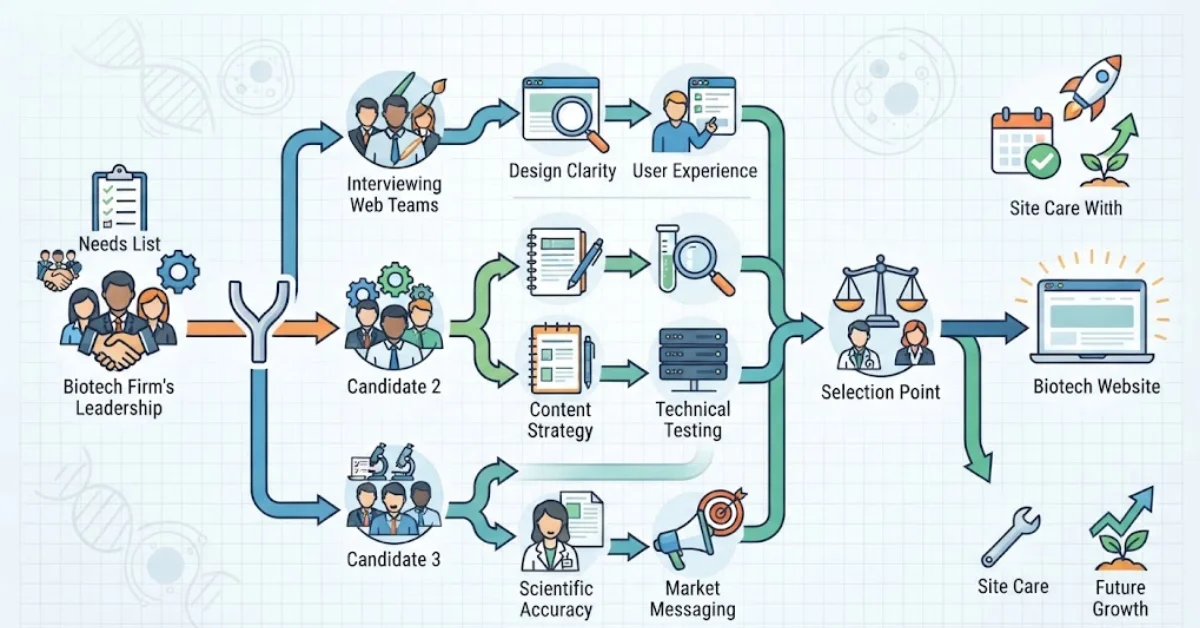
A good web team should know your goals and explain how it will meet them. Nice design is only one part of the job.
Ask how the team plans pages, writes content, builds the site, and tests it. Check its past work. Look for sites that make complex topics easy to read.
Bring the right people into the project. Scientists can check the facts. Marketing staff can review the message. Business leaders can make sure the site fits the firm’s goals.
Agree on the cost, work, and launch date before the project starts. Ask what the price covers. Find out if site care after launch costs extra.
WebsiteForClinics offers website design and development services for firms that need a clear online presence. If you plan a biotech site, list your needs first. Then ask web teams how they can meet them.
Choose a team that fits your needs and budget. Be careful with claims about instant traffic or guaranteed search ranks.
A clear plan can help the project run well. It also makes the site easier to update as your firm grows.